

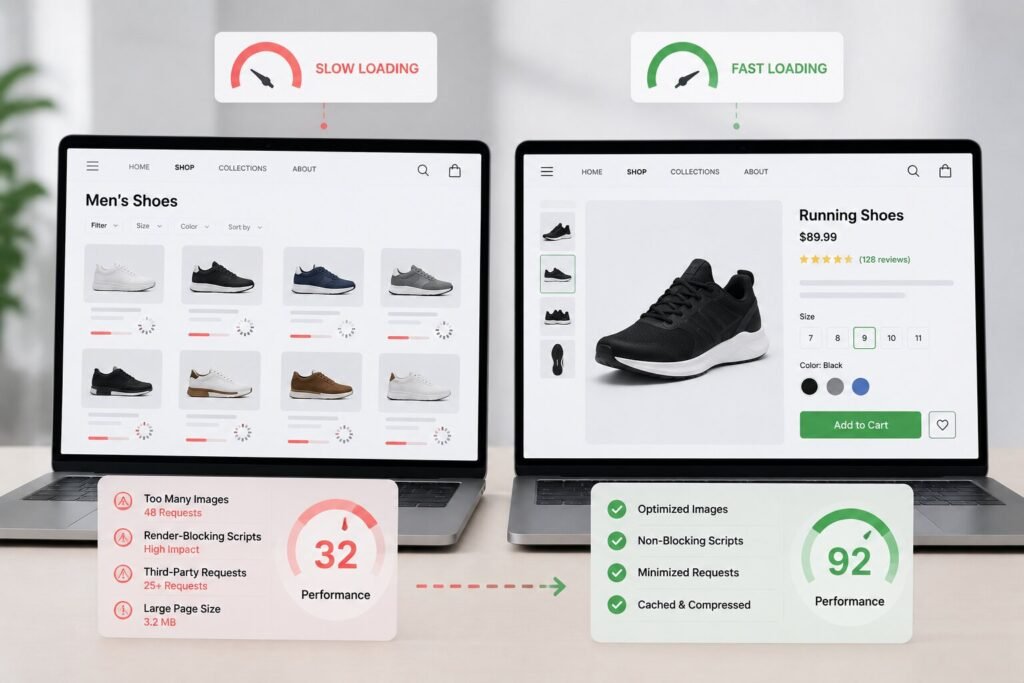

Category pages carry a lot of weight in ecommerce. They connect landing traffic to individual products, rank for broad commercial keywords, and are often the first real impression a store makes on a shopper arriving from search. Every collection page, product listing page, or filtered browse view falls into this category, and yet in performance audits, they consistently score worse than product pages, even on stores that have otherwise invested to improve website speed.
The gap is not random. It comes down to how these pages are built, what they are asked to load, and how little attention they typically receive compared to the pages that sit just one click deeper. The reasons are more structural than obvious, and understanding them is the first step toward fixing them.
The Structural Weight Nobody Accounts For
A product page loads one item, one image set, one price, one description. A category page loads dozens at once, each with its own thumbnail, title, price, and badge. That volume does not inherently cause slowness, but the way most stores handle it does.
The typical category page renders every grid item before it becomes interactive and loads every thumbnail at full resolution regardless of scroll depth. Product pages get deliberate performance attention during development; category pages are generated from templates and left alone, meaning every performance issue in that template multiplies across the entire product grid.
What Actually Slows These Pages Down
Most category page performance issues come down to a handful of common causes.
The Image Grid Problem
A category page with 48 products can generate dozens of image requests before the shopper sees anything. Lazy loading addresses this in theory, but many platforms skip it on category grids or fire it too late. A single oversized JPEG on a product page is a small problem; replicated across an entire grid, it becomes a Largest Contentful Paint (LCP) failure, a Core Web Vitals metric and confirmed Google ranking signal that directly affects both search visibility and user experience.
Filter and Sort Scripts That Block Rendering
Category pages almost always carry filter and sort functionality by price, size, color, availability, and those features load JavaScript synchronously on most implementations, blocking rendering until fully parsed. A shopper has no interest in filtering until the products are visible, but the browser does not differentiate.
Deferring these render-blocking scripts until after the initial grid appears can improve how quickly the page becomes interactive. On platforms where filter logic comes from third-party apps, this is often harder to control and the load time impact tends to be worse.
Third-Party Requests at Grid Scale
Review counts, ratings badges, and wishlist buttons often pull from third-party services. On a product page, that means one or two external calls. On a category page, those features fire separately for every visible product, multiplying requests in a way that degrades Interaction to Next Paint (INP) scores, meaning the page looks loaded but feels unresponsive when a shopper tries to click.
Why Mobile Takes the Hardest Hit
On desktop, the gap between a fast and slow category page is manageable. On mobile, it is punishing. Mobile networks add latency to every request and mobile processors handle JavaScript more slowly. A category page scoring 70 on desktop can easily fall below 30 on mobile, not because the test is stricter, but because the page was never built with mobile constraints in mind.
53 percent of mobile visits are abandoned if a page takes longer than three seconds to load, and category pages frequently cross that threshold. Mobile speed optimization here means images sized for smaller viewports and above-the-fold content defined so the browser renders the right things first.
The SEO Consequence of Slow Category Pages
Category pages rank for the highest-volume, most competitive keywords in a store’s vertical. Poor Core Web Vitals performance on those pages, particularly LCP and INP, can contribute to weaker page experience signals and reduce user engagement over time.
There is also a crawl budget dimension. Heavy pages consume Googlebot’s crawl requests faster, so a slow category page may be revisited less frequently, delaying indexing of newly added products.
The effort to improve website speed on category pages often delivers outsized SEO returns precisely because most competitors are ignoring the same problem. Google’s PageSpeed Insights and GTmetrix both identify whether the bottleneck is image rendering, JavaScript execution, or third-party request volume.
Final Thoughts
Category pages are not simply bigger product pages, they are a different performance problem entirely. The volume of content, the complexity of interactive features, and the mobile rendering gap make them consistently slower despite being more valuable to organic traffic. Giving them the same performance attention as product pages is one of the more direct paths to better rankings and a browsing experience that actually converts.
Frequently Asked Questions
Why do category pages score lower on PageSpeed Insights than product pages?
Category pages load far more images, scripts, and third-party calls at once, so performance problems multiply across every item in the grid rather than staying contained to one.
What is the fastest fix for a slow category page?
Lazy loading grid images and deferring filter/sort JavaScript delivers the most immediate impact without requiring design changes.
Does pagination help with category page speed?
Yes. Showing 24 products per page instead of 48 or more reduces image requests, DOM size, and JavaScript execution on first load.
Why do category pages perform worse on mobile than desktop?
Mobile processors handle JavaScript more slowly, and mobile networks add latency to every request, compounding issues that appear manageable on desktop.
Does a slow category page affect how often it gets crawled?
Yes. Heavy pages consume crawl budget faster, which can delay how quickly new products in that category get indexed.